TRANSLATION FOR REAL LIFE
How to prepare offline translation before a trip
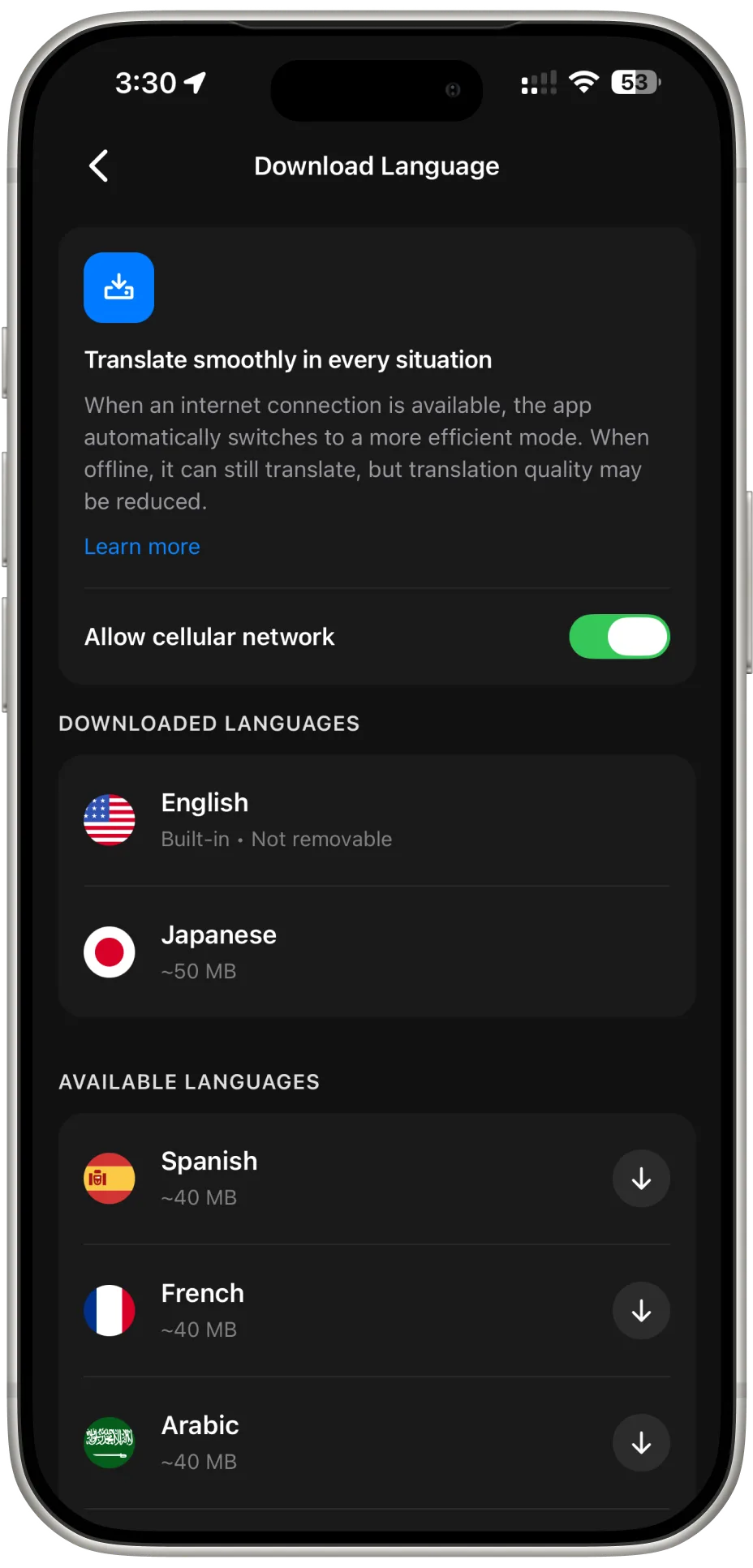
Speakly supports downloadable offline language packs for essential translation when you lose your connection. Prepare the languages you need while you are online, and test the specific translation features you plan to use before your trip.
Prepare while you have a connection
- Open Speakly and find the offline language options. Check whether the languages you need are available to download.
- Download the supported language packs before you leave. English is built in; other supported packs need to be downloaded in advance.
- Wait for each download to finish. Check that the languages are available before closing the app.
- Temporarily switch off Wi-Fi and mobile data, then try the language pair and translation feature you expect to use. Turn your connection back on when you finish testing.
What offline support means
The language list for translation and the list of downloadable offline packs are not identical. A language being available online does not necessarily mean it can be downloaded. Check the offline list in the app for your destination languages.
An offline pack is not a guarantee that every voice, camera, or real-time feature will work without a connection. Availability depends on the selected language, device, and feature. Test the exact workflow you need instead of relying only on the download being complete.
Make a simple travel backup
Keep your accommodation address, booking information, and important questions in a form you can access without internet. For example, have your destination address in its original writing ready to show a driver.
Use short, direct sentences when you translate. If a result seems unclear, rephrase it and check with the person you are speaking to. When your connection returns, Speakly's online text, speech, photo, and conversation features offer additional ways to communicate.